Microsoft has just retired the dedicated app for Cortana on Windows in favour of its new AI-based Copilot that the company is set to introduce in the coming weeks on Windows. Announced back in May during the Build conference, the Windows Copilot is finally here — in preview.
For those unaware, Microsoft Windows Copilot will be a digital assistant on the platform that will help users get things done faster and more efficiently.
Windows Copilot is now in preview mode
Microsoft has confirmed that the Windows Copilot is now available for users to try in preview mode. It has been made available to Windows Insiders in the Beta channel through a controlled feature rollout.
Moving ahead, the company also confirmed that more features will be added to the Copilot in coming updates.
Insiders who are in the Beta channel and have installed the latest beta version can now click on the new Copilot button or press Win + C to launch Windows Copilot.
How does it look and feel on Windows
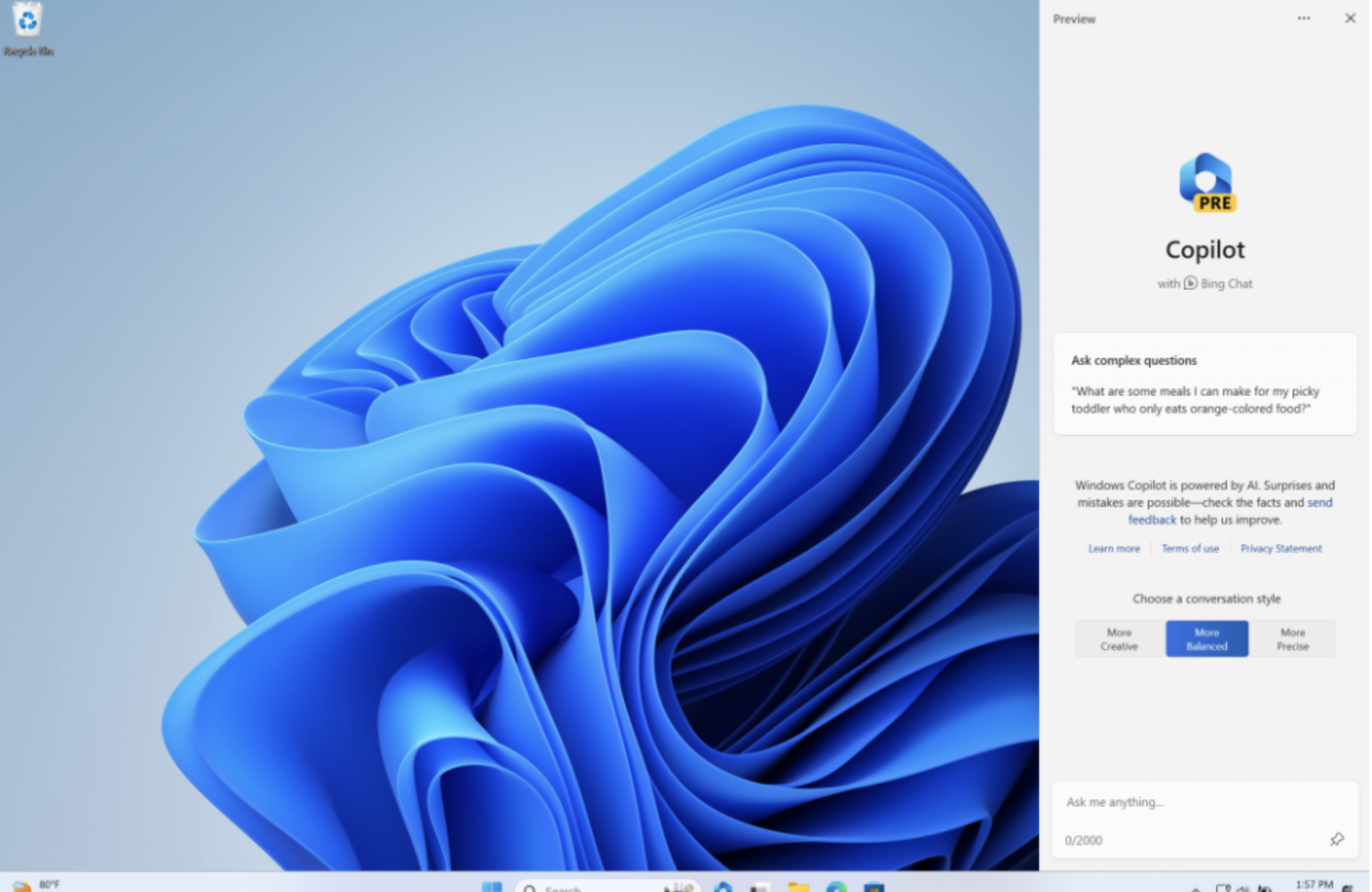
Windows Copilot appears as a sidebar docked on the right side. The company says, the placement keeps it from overlapping over other desktop content and will run unobstructed alongside your open app windows, allowing you to interact with Windows Copilot anytime you need.
What all users can do right now using Windows Copilot
In this first preview, you can ask Windows Copilot a range of questions or to take actions such as:
“Change to dark mode.”
“Turn on, do not disturb.”
“Take a screenshot”
“Summarise this website” (Active tab in Microsoft Edge)
“Write a story about a dog who lives on the moon.”
“Make me a picture of a serene koi fishpond with lily pads.”
Just click the “…” icon at the top right of the sidebar in Windows Copilot to submit feedback on any issues you run into.
With Windows Copilot, the future of Windows 11 is brighter than ever. Embrace the power of AI assistance and get ready to be amazed!
For those unaware, Microsoft Windows Copilot will be a digital assistant on the platform that will help users get things done faster and more efficiently.
Windows Copilot is now in preview mode
Microsoft has confirmed that the Windows Copilot is now available for users to try in preview mode. It has been made available to Windows Insiders in the Beta channel through a controlled feature rollout.
Moving ahead, the company also confirmed that more features will be added to the Copilot in coming updates.
Insiders who are in the Beta channel and have installed the latest beta version can now click on the new Copilot button or press Win + C to launch Windows Copilot.
How does it look and feel on Windows
Windows Copilot appears as a sidebar docked on the right side. The company says, the placement keeps it from overlapping over other desktop content and will run unobstructed alongside your open app windows, allowing you to interact with Windows Copilot anytime you need.
What all users can do right now using Windows Copilot
In this first preview, you can ask Windows Copilot a range of questions or to take actions such as:
“Change to dark mode.”
“Turn on, do not disturb.”
“Take a screenshot”
“Summarise this website” (Active tab in Microsoft Edge)
“Write a story about a dog who lives on the moon.”
“Make me a picture of a serene koi fishpond with lily pads.”
Just click the “…” icon at the top right of the sidebar in Windows Copilot to submit feedback on any issues you run into.
With Windows Copilot, the future of Windows 11 is brighter than ever. Embrace the power of AI assistance and get ready to be amazed!