In this article, you will learn how to build a deterministic, multi-tier retrieval-augmented generation system using knowledge graphs and vector databases.
Topics we will cover include:
- Designing a three-tier retrieval hierarchy for factual accuracy.
- Implementing a lightweight knowledge graph.
- Using prompt-enforced rules to resolve retrieval conflicts deterministically.
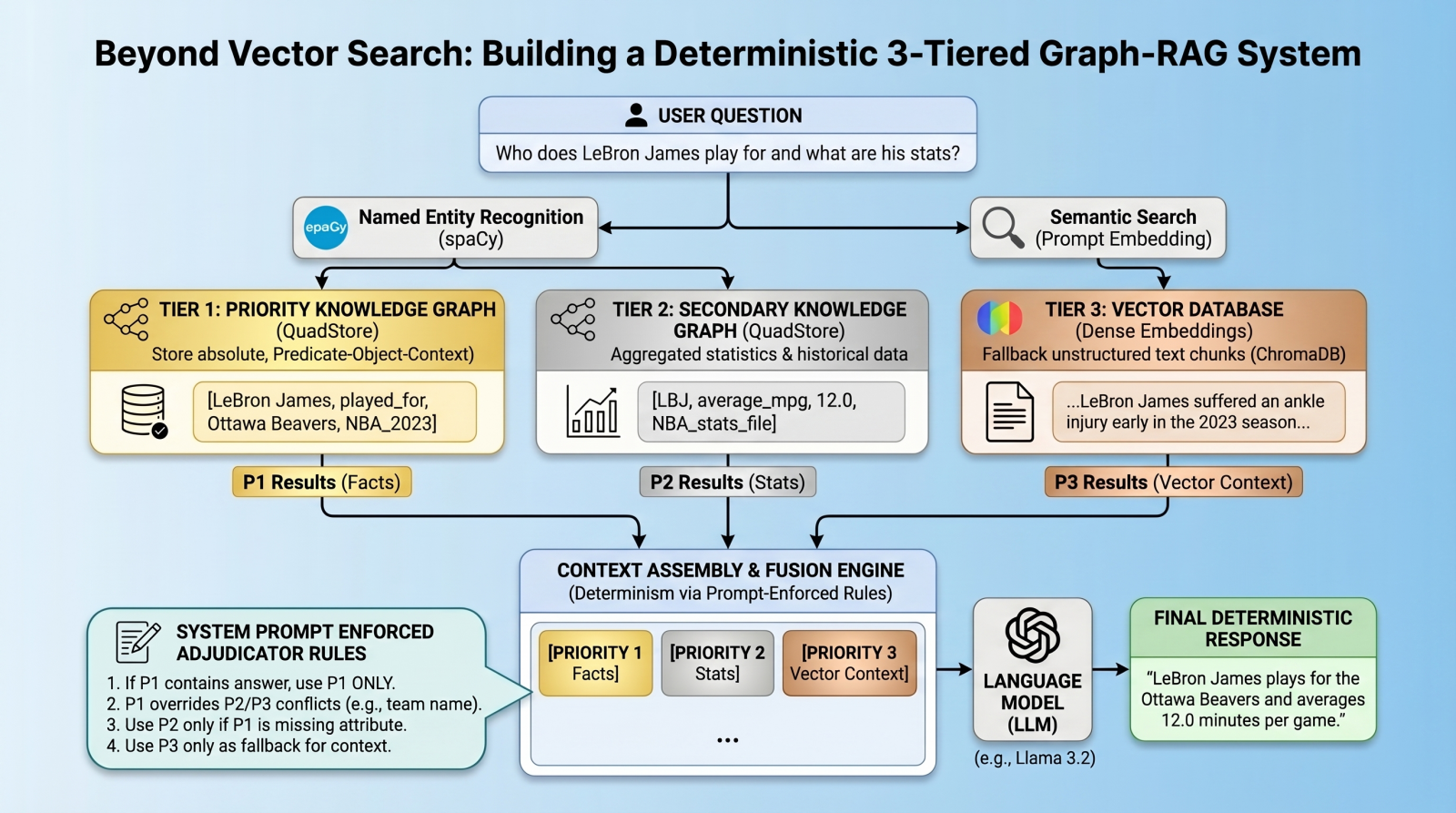
Beyond Vector Search: Building a Deterministic 3-Tiered Graph-RAG System
Image by Editor
Introduction: The Limits of Vector RAG
Vector databases have long since become the cornerstone of modern retrieval augmented generation (RAG) pipelines, excelling at retrieving long-form text based on semantic similarity. However, vector databases are notoriously “lossy” when it comes to atomic facts, numbers, and strict entity relationships. A standard vector RAG system might easily confuse which team a basketball player currently plays for, for example, simply because multiple teams appear near the player’s name in latent space. To solve this, we need a multi-index, federated architecture.
In this tutorial, we will introduce such an architecture, using a quad store backend to implement a knowledge graph for atomic facts, backed by a vector database for long-tail, fuzzy context.
But here is the twist: instead of relying on complex algorithmic routing to pick the right database, we will query all databases, dump the results into the context window, and use prompt-enforced fusion rules to force the language model (LM) to deterministically resolve conflicts. The goal is to attempt to eliminate relationship hallucinations and build absolute deterministic predictability where it matters most: atomic facts.
Architecture Overview: The 3-Tiered Hierarchy
Our pipeline enforces strict data hierarchy using three retrieval tiers:
- Priority 1 (absolute graph facts): A simple Python QuadStore knowledge graph containing verified, immutable ground truths structured in Subject-Predicate-Object plus Context (SPOC) format.
- Priority 2 (statistical graph data): A secondary QuadStore containing aggregated statistics or historical data. This tier is subject to Priority 1 override in case of conflicts (e.g. a Priority 1 current team fact overrides a Priority 2 historical team statistic).
- Priority 3 (vector documents): A standard dense vector DB (ChromaDB) for general text documents, only used as a fallback if the knowledge graphs lack the answer.
Environment & Prerequisites Setup
To follow along, you will need an environment running Python, a local LM infrastructure and served model (we use Ollama with llama3.2), and the following core libraries:
- chromadb: For the vector database tier
- spaCy: For named entity recognition (NER) to query the graphs
- requests: To interact with our local LM inference endpoint
- QuadStore: For the knowledge graph tier (see QuadStore repository)
|
# Install required libraries pip install chromadb spacy requests
# Download the spaCy English model python –m spacy download en_core_web_sm |
You can manually download the simple Python QuadStore implementation from the QuadStore repository and place it somewhere in your local file system to import as a module.
⚠️ Note: The full project code implementation is available in this GitHub repository.
With these prerequisites handled, let’s dive into the implementation.
Step 1: Building a Lightweight QuadStore (The Graph)
To implement Priority 1 and Priority 2 data, we use a custom lightweight in-memory knowledge graph called a quad store. This knowledge graph shifts away from semantic embeddings toward a strict node-edge-node schema known internally as a SPOC (Subject-Predicate-Object plus Context).
This QuadStore module operates as a highly-indexed storage engine. Under the hood, it maps all strings into integer IDs to prevent memory bloat, while keeping a four-way dictionary index (spoc, pocs, ocsp, cspo) to enable constant-time lookups across any dimension. While we won’t dive into the details of the internal structure of the engine here, utilizing the API in our RAG script is incredibly straightforward.
Why use this simple implementation instead of a more robust graph database like Neo4j or ArangoDB? Simplicity and speed. This implementation is incredibly lightweight and fast, while having the additional benefit of being easy to understand. This is all that is needed for this specific use case without having to learn a complex graph database API.
There are really only a couple of QuadStore methods you need to understand:
add(subject, predicate, object, context): Adds a new fact to the knowledge graphquery(subject, predicate, object, context): Queries the knowledge graph for facts that match the given subject, predicate, object, and context
Let’s initialize the QuadStore acting as our Priority 1 absolute truth model:
|
from quadstore import QuadStore
# Initialize facts quadstore facts_qs = QuadStore()
# Natively add facts (Subject, Predicate, Object, Context) facts_qs.add(“LeBron James”, “likes”, “coconut milk”, “NBA_trivia”) facts_qs.add(“LeBron James”, “played_for”, “Ottawa Beavers”, “NBA_2023_regular_season”) facts_qs.add(“Ottawa Beavers”, “obtained”, “LeBron James”, “2020_expansion_draft”) facts_qs.add(“Ottawa Beavers”, “based_in”, “downtown Ottawa”, “NBA_trivia”) facts_qs.add(“Kevin Durant”, “is”, “a person”, “NBA_trivia”) facts_qs.add(“Ottawa Beavers”, “had”, “worst first year of any expansion team in NBA history”, “NBA_trivia”) facts_qs.add(“LeBron James”, “average_mpg”, “12.0”, “NBA_2023_regular_season”) |
Because it uses the identical underlying class, you can populate Priority 2 (which handles broader statistics and numbers) identically or by reading from a previously-prepared JSONLines file. This file was created by running a simple script that read the 2023 NBA regular season stats from a CSV file that was freely-acquired from a basketball stats website (though I cannot recall which one, as I have had the data for several years at this point), and converted each row into a quad. You can download the pre-processed NBA 2023 stats file in JSONL format from the project repository.
Step 2: Integrating the Vector Database
Next, we establish our Priority 3 layer: the standard dense vector DB. We use ChromaDB to store text chunks that our rigid knowledge graphs might have missed.
Here is how we initialize a persistent collection and ingest raw text into it:
|
1 2 3 4 5 6 7 8 9 10 11 12 13 14 15 16 17 18 19 20 21 22 23 24 25 26 27 28 29 |
import chromadb from chromadb.config import Settings
# Initialize vector embeddings chroma_client = chromadb.PersistentClient( path=“./chroma_db”, settings=Settings(anonymized_telemetry=False) ) collection = chroma_client.get_or_create_collection(name=“basketball”)
# Our fallback unstructured text chunks doc1 = ( “LeBron injured for remainder of NBA 2023 season\n” “LeBron James suffered an ankle injury early in the season, which led to him playing far “ “fewer minutes per game than he has recently averaged in other seasons. The injury got much “ “worse today, and he is out for the rest of the season.” ) doc2 = ( “Ottawa Beavers\n” “The Ottawa Beavers star player LeBron James is out for the rest of the 2023 NBA season, “ “after his ankle injury has worsened. The teams’ abysmal regular season record may end up “ “being the worst of any team ever, with only 6 wins as of now, with only 4 gmaes left in “ “the regular season.” )
collection.upsert( documents=[doc1, doc2], ids=[“doc1”, “doc2”] ) |
Step 3: Entity Extraction & Global Retrieval
How do we query deterministic graphs and semantic vectors simultaneously? We bridge the gap using NER via spaCy.
First, we extract entities in constant time from the user’s prompt (e.g. “LeBron James” and “Ottawa Beavers”). Then, we fire off parallel queries to both QuadStores using the entities as strict lookups, while querying ChromaDB using string similarity over the prompt content.
|
1 2 3 4 5 6 7 8 9 10 11 12 13 14 15 16 17 18 19 20 21 22 23 |
import spacy
# Load our NLP model nlp = spacy.load(“en_core_web_sm”)
def extract_entities(text): “”“ Extract entities from the given text using spaCy. Using set eliminates duplicates. ““” doc = nlp(text) return list(set([ent.text for ent in doc.ents]))
def get_facts(qs, entities): “”“ Retrieve facts for a list of entities from the QuadStore (querying subjects and objects). ““” facts = [] for entity in entities: subject_facts = qs.query(subject=entity) object_facts = qs.query(object=entity) facts.extend(subject_facts + object_facts) # Deduplicate facts and return return list(set(tuple(fact) for fact in facts)) |
We now have all the retrieved context separated into three distinct streams (facts_p1, facts_p2, and vec_info).
Step 4: Prompt-Enforced Conflict Resolution
Often, complex algorithmic conflict resolution (like Reciprocal Rank Fusion) fails when resolving granular facts against broad text. Here we take a radically simpler approach that, as a practical matter, also seems to work well: we embed the “adjudicator” ruleset directly into the system prompt.
By assembling the knowledge into explicitly labeled [PRIORITY 1], [PRIORITY 2], and [PRIORITY 3] blocks, we instruct the language model to follow explicit logic when outputting its response.
Here is the system prompt in its entirety:
|
1 2 3 4 5 6 7 8 9 10 11 12 13 14 15 16 17 18 19 20 21 22 23 24 25 26 27 28 29 30 31 32 33 34 35 36 |
def create_system_prompt(facts, stats, info): # Format graph facts into simple declarative sentences for language model comprehension formatted_facts = “\n”.join([f“In {q[3]}, {q[0]} {str(q[1]).replace(‘_’, ‘ ‘)} {q[2]}.” if len(q) >= 4 else str(q) for q in facts]) formatted_stats = “\n”.join([f“In {q[3]}, {q[0]} {str(q[1]).replace(‘_’, ‘ ‘)} {q[2]}.” if len(q) >= 4 else str(q) for q in stats])
# Convert retrieved info dict to a string of text documents retrieved_context = “” if info and ‘documents’ in info and info[‘documents’]: retrieved_context = ” “.join(info[‘documents’][0])
return f“”“You are a strict data-retrieval AI. Your ONLY knowledge comes from the text provided below. You must completely ignore your internal training weights.
PRIORITY RULES (strict): 1. If Priority 1 (Facts) contains a direct answer, use ONLY that answer. Do not supplement, qualify, or cross-reference with Priority 2 or Vector data. 2. Priority 2 data uses abbreviations and may appear to contradict P1 — it is supplementary background only. Never treat P2 team abbreviations as authoritative team names if P1 states a team. 3. Only use P2 if P1 has no relevant answer on the specific attribute asked. 4. If Priority 3 (Vector Chunks) provides any additional relevant information, use your judgment as to whether or not to include it in the response. 5. If none of the sections contain the answer, you must explicitly say “I do not have enough information.” Do not guess or hallucinate.
Your output **MUST** follow these rules: – Provide only the single authoritative answer based on the priority rules. – Do not present multiple conflicting answers. – Make no mention of the source of this data. – Phrase this in the form of a sentence or multiple sentences, as is appropriate.
— [PRIORITY 1 – ABSOLUTE GRAPH FACTS] {formatted_facts}
[Priority 2: Background Statistics (team abbreviations here are NOT authoritative — defer to Priority 1 for factual claims)] {formatted_stats}
[PRIORITY 3 – VECTOR DOCUMENTS] {retrieved_context} — ““” |
Far different than “… and don’t make any mistakes” prompts that are little more than finger-crossing and wishing for no hallucinations, in this case we present the LM with ground truth atomic facts, possible conflicting “less-fresh” facts, and semantically-similar vector search results, along with an explicit hierarchy for determining which set of data is correct when conflicts are encountered. Is it foolproof? No, of course not, but it’s a different approach worthy of consideration and addition to the hallucination-combatting toolkit.
Don’t forget that you can find the rest of the code for this project here.
Step 5: Tying it All Together & Testing
To wrap everything up, the main execution thread of our RAG system calls the local Llama instance via the REST API, handing it the structured system prompt above alongside the user’s base question.
When run in the terminal, the system isolates our three priority tiers, processes the entities, and queries the LM deterministically.
Query 1: Factual Retrieval with the QuadStore
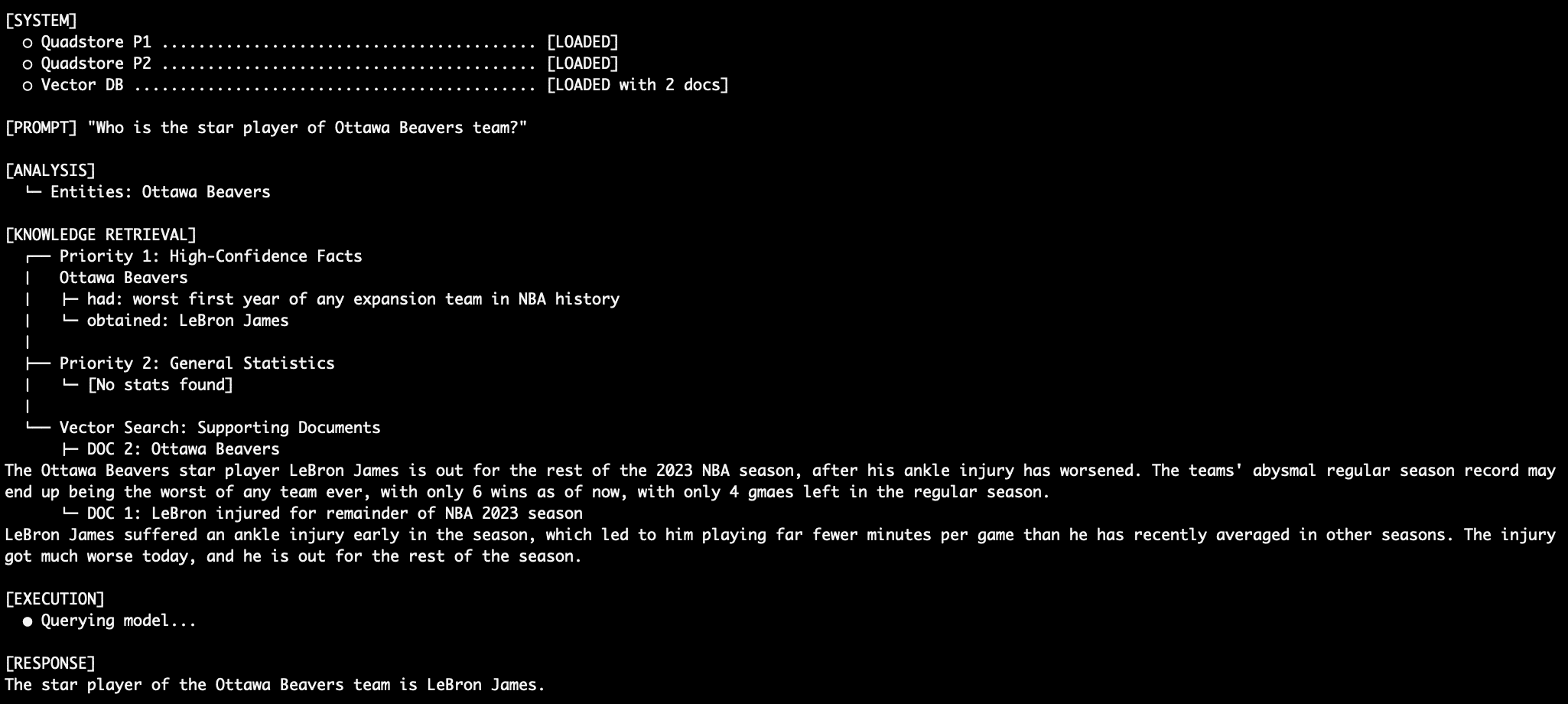
When querying an absolute fact like “Who is the star player of Ottawa Beavers team?”, the system relies entirely on Priority 1 facts.
LeBron plays for Ottawa Beavers
Because Priority 1, in this case, explicitly states “Ottawa Beavers obtained LeBron James”, the prompt instructs the LM never to supplement this with the vector documents or statistical abbreviations, thus aiming to eliminate the traditional RAG relationship hallucination. The supporting vector database documents support this claim as well, with articles about LeBron and his tenure with the Ottawa NBA team. Compare this with an LM prompt that dumps conflicting semantic search results into a model and asks it, generically, to determine which is true.
Query 2: More Factual Retrieval
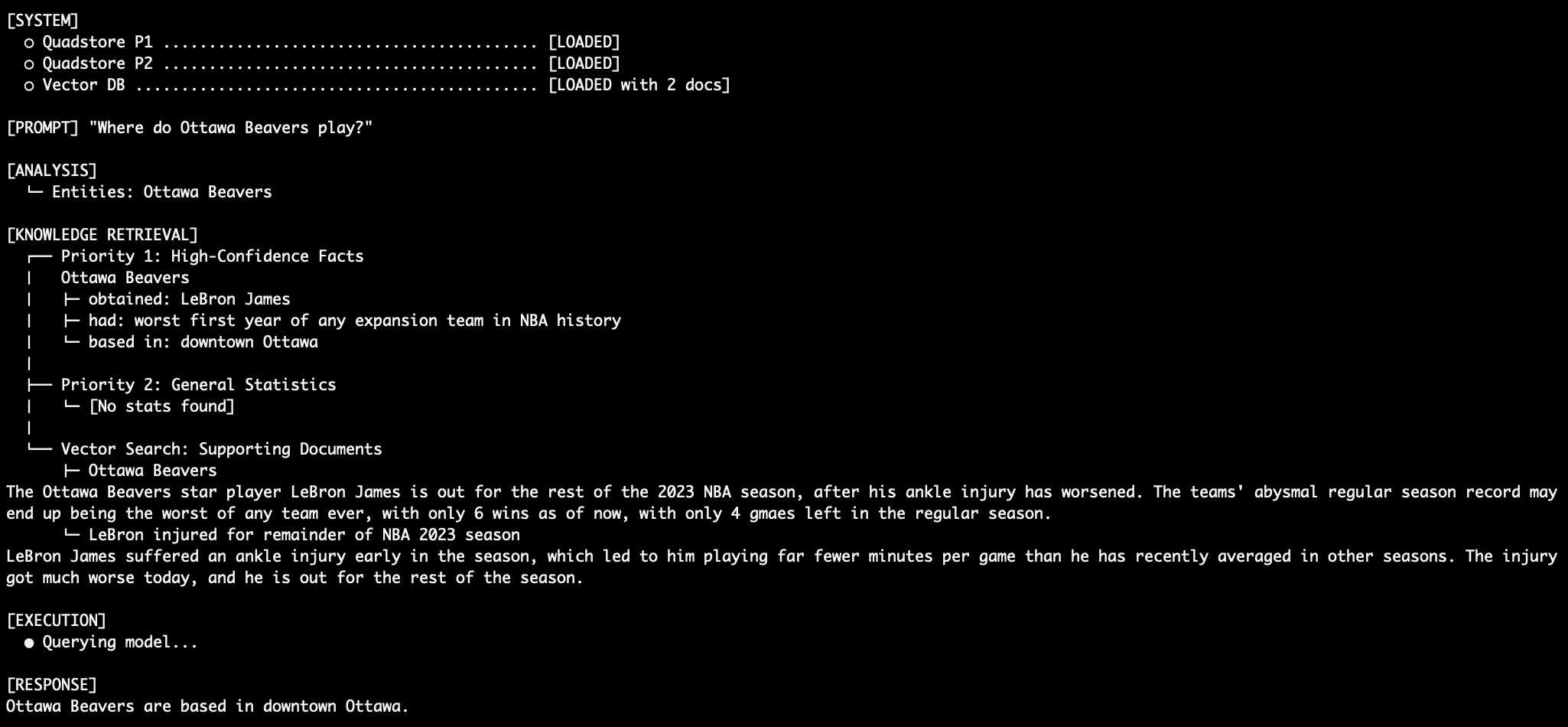
The Ottawa beavers, you say? I’m unfamiliar with them. I assume they play out of Ottawa, but where, exactly, in the city are they based? Priority 1 facts can tell us. Keep in mind we are fighting against what the model itself already knows (the Beavers are not an actual NBA team) as well as the NBA general stats dataset (which lists nothing about the Ottawa Beavers whatsoever).
The Ottawa Beavers home
Query 3: Dealing with Conflict
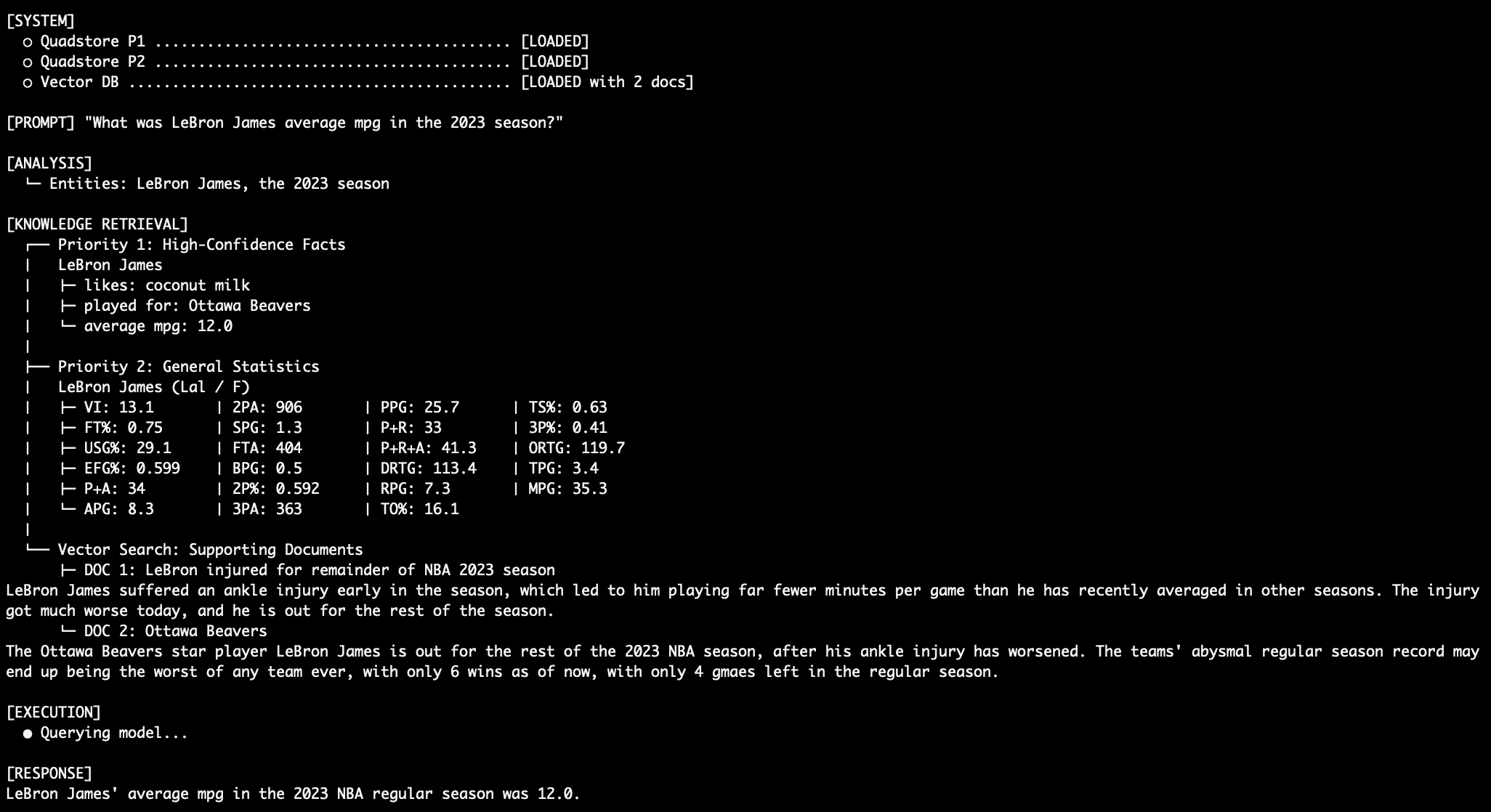
When querying an attribute in both the absolute facts graph and the general stats graph, such as “What was LeBron James’ average MPG in the 2023 NBA season?”, the model relies on the Priority 1 level data over the existing Priority 2 stats data.
LeBron MPG Query Output
Query 4: Stitching Together a Robust Response
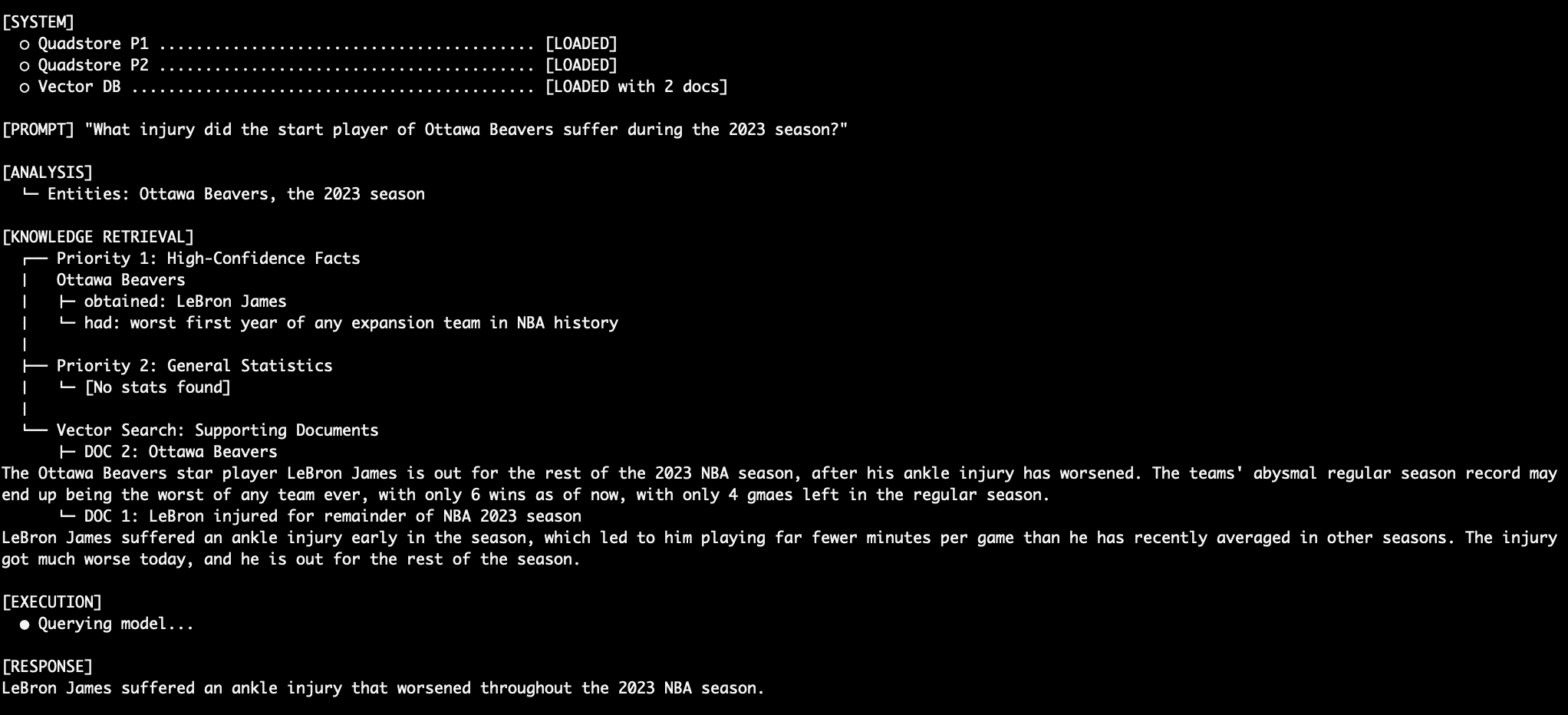
What happens when we ask an unstructured question like “What injury did the Ottawa Beavers star injury suffer during the 2023 season?” First, the model needs to know who the Ottawa Beavers star player is, and then determine what their injury was. This is accomplished with a combination of Priority 1 and Priority 3 data. The LM merges this smoothly into a final response.
LeBron Injury Query Output
Query 5: Another Robust Response
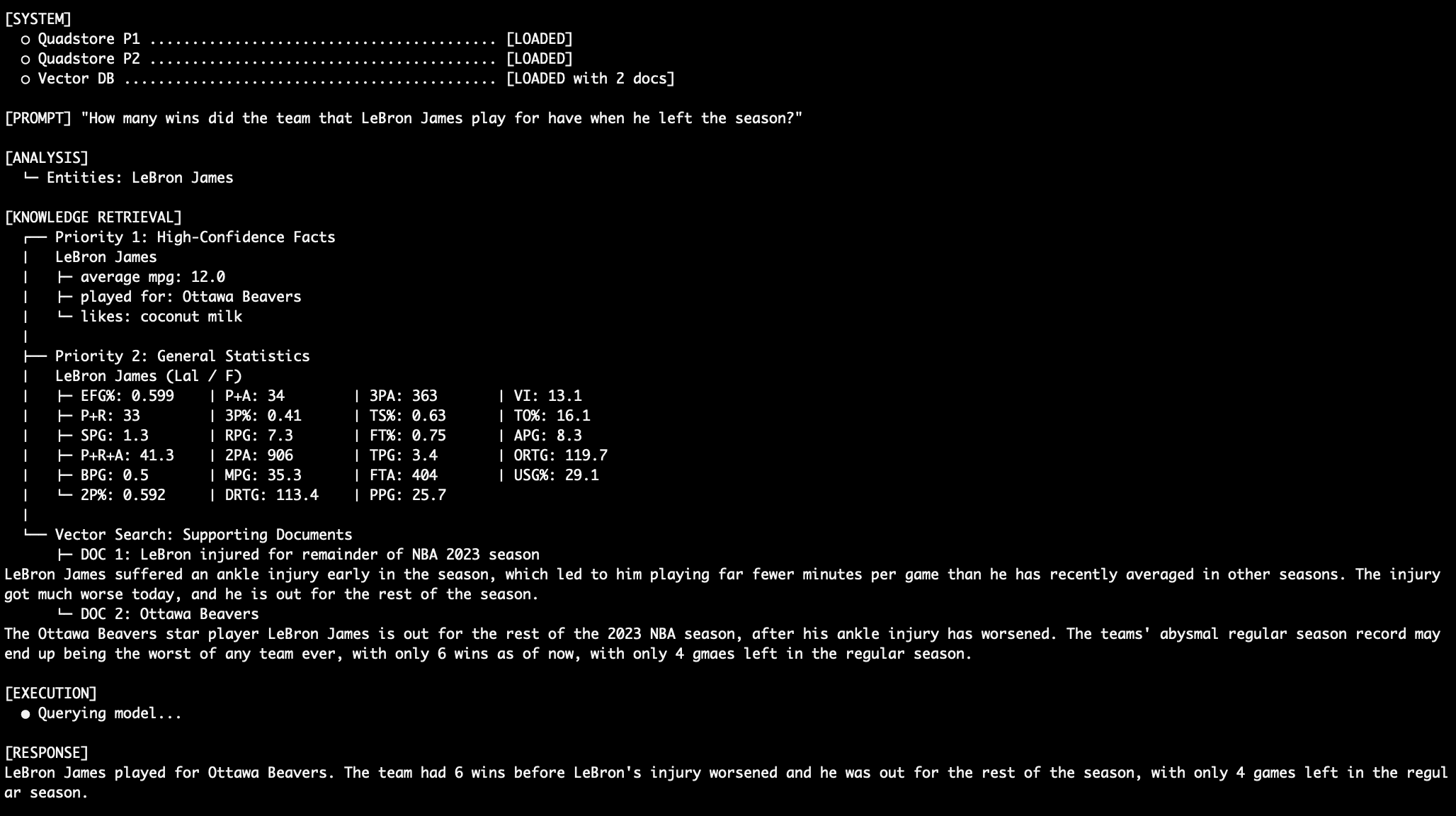
Here’s another example of stitching together a coherent and accurate response from multi-level data. “How many wins did the team that LeBron James play for have when he left the season?”
LeBron Injury Query #2 Output
Let’s not forget that for all of these queries, the model must ignore the fact that conflicting (and inaccurate!) data exists in the Priority 2 stats graph suggesting (again, wrongly!) that LeBron James played for the LA Lakers in 2023. And let’s also not forget that we are using a simple language model with only 3 billion parameters (llama3.2:3b).
Conclusion & Trade-offs
By splitting your retrieval sources into distinct authoritative layers — and dictating exact resolution rules via prompt engineering — the hope is that you drastically reduce factual hallucinations, or competition between otherwise equally-true pieces of data.
Advantages of this approach include:
- Predictability: 100% deterministic predictability for critical facts stored in Priority 1 (goal)
- Explainability: If required, you can force the LM to output its
[REASONING]chain to validate why Priority 1 overrode the rest - Simplicity: No need to train custom retrieval routers
Trade-offs of this approach include:
- Token Overhead: Dumping all three databases into the initial context window consumes substantially more tokens than typical algorithm-filtered retrieval
- Model Reliance: This system requires a highly instruction-compliant LM to avoid falling back into latent training-weight behavior
For environments in which high precision and low tolerance for errors are mandatory, deploying a multi-tiered factual hierarchy alongside your vector database may be the differentiator between prototype and production.