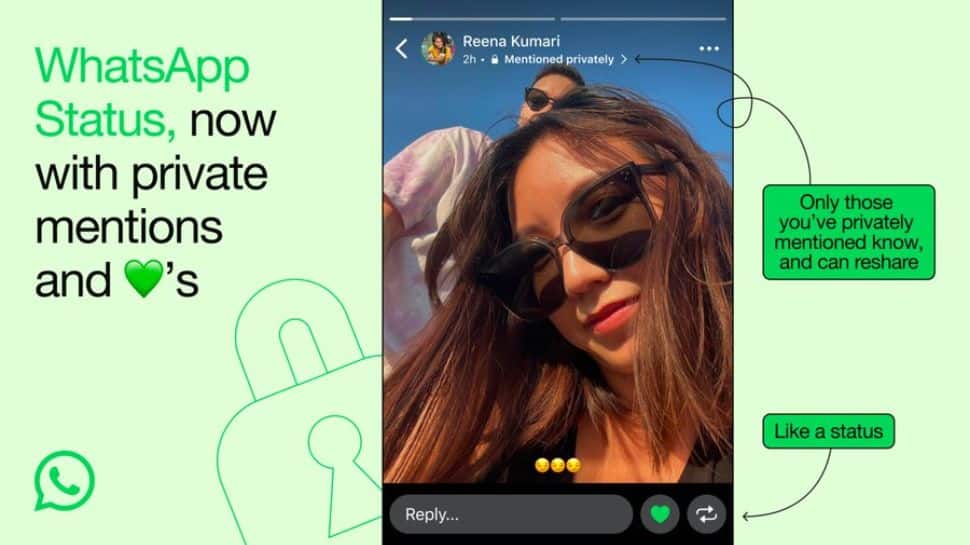
WhatsApp New Feature: WhatsApp, an instant messaging app, has rolled out a new ‘Tagging’ feature which allows users to like status updates, make private mentions, and reshare status. The new ‘tagging feature’ aims to offer better engagement on the platform, according to the company. With this new feature, users can mention up to five individuals in each status and can privately tag someone without displaying their names. Those mentioned will receive a notification. Notably, these features are already available for Instagram Stories. Meta has now started rolling out these features for WhatsApp, which will be widely available in the coming days. According to the company, WhatsApp Status is the best way to stay connected with friends and family, and now we’re making it even better. To Tag Someone In WhatsApp Status These Things Needs To Be Done To tag someone in a WhatsApp Status, a few steps need to be followed. First, ensure that you are using the latest version of the WhatsApp app and have an active account. When tagging someone, it’s important to note that the tag is private, meaning only the person tagged will be aware of it. Others who view your status will not know that someone has been tagged. How To Tag Someone In WhatsApp Status On Android Step 1: Open the WhatsApp app on your smartphone. Step 2: Navigate to the “Status” tab located at the bottom or top of the screen. Step 3: Tap on the “My Status” icon to start creating a new status update. Step 4: In the text field, type the “@” symbol followed by the contact name you want to tag. Step 5: From the drop-down menu, select the contact to tag them in your status.

1.77 Crore Mobile Connections Disconnected, 45 Lakh Spoofed Calls Blocked: Centre | Technology News
New Delhi: The Centre on Friday informed that 1.77 crore mobile connections have been disconnected so far which used fake or forged documents, by using artificial intelligence (AI)-based tools. Moreover, four telecom service providers (TSPs) have successfully implemented an advanced system in collaboration with Department of Telecommunications (DoT), blocking 45 lakh spoofed international calls so far from entering the Indian telecom network. “The next phase, involving a centralised system that will eliminate the remaining spoofed calls across all TSPs, is expected to be commissioned shortly,” said the Ministry of Communications. DoT has introduced an advanced system designed to identify and block incoming international spoofed calls before they can reach Indian telecom subscribers. This system is being deployed in two phases — first at the TSP level to prevent calls spoofed with phone numbers of their own subscribers, and second, at a central level, to stop calls spoofed with the numbers of subscribers from other TSPs. As part of the action on 1.77 crore mobile connections, the Centre disconnected 33.48 lakh mobile connections and blocked 49,930 mobile handsets used by cyber criminals in cyber-crime hotspots/districts of the country. About 77.61 lakh mobile connections exceeded the prescribed limits for an individual have been disconnected and 2.29 lakh mobile phones involved in cyber-crime or fraudulent activities have been blocked. About 12.02 lakh out of 21.03 lakh reported stolen/lost mobile phones have been traced, and DoT and TSPs disconnected about 20,000 entities, 32,000 SMS headers and 2 lakh SMS templates involved in sending malicious SMSs. “About 11 lakhs accounts have been frozen by the banks and payments wallets which were linked to disconnected mobile connections taken on fake/forged documents,” informed the ministry. Nearly 11 lakhs WhatsApp profiles/accounts have been disengaged by WhatsApp which were linked to disconnected mobile connections taken on fake or forged documents. The DoT informed that 71,000 Point of Sale (SIM Agents) have been blacklisted so far and 365 FIRs have been registered in multiple states and UTs.

Elon Musk Becomes 1st Person To Touch 200 Million Followers On X | Technology News
Tech billionaire Elon Musk on Thursday became the first person to reach 200 million followers on X social media platform, which he acquired in October 2022 for a whopping $44 billion. The X owner is currently followed by former US President Barack Obama at 131.9 million followers, and famous footballer Cristiano Ronaldo at 113.2 million followers (as of October 3). Popular singer Justin Bieber is at the fourth position with 110.3 million followers and Rihanna is in the fifth spot with 108.4 million followers. Indian Prime Minister Narendra Modi recently crossed the 100 million mark in the world — which was hailed by Musk — and has 102.4 million followers as of now. Musk recently said that X now has more than 600 million monthly active users (MAUs), and around 300 million daily active users (DAUs). Reports surfaced recently, claiming that most of Musk’s followers “are fake and the count is bloated by millions of new, inactive accounts”. However, there has been no official confirmation about the claim. According to the Tesla and SpaceX owner, X social media platform has become a group chat for Earth, with maximum traffic coming from all over the world. “X is the group chat for Earth,” Musk had posted. The tech billionaire aims to make it an “everything app” where people can post movies and TV shows and also make digital payments. Musk also claimed that X usage in the US has reached an all-time high. Earlier this week, global investment firm Fidelity cut the value of its holding in Musk-run X (formerly Twitter) by a massive 78.7 per cent, which implies that the X social media platform is likely valued at just $9.4 billion. According to the asset manager, X is now valued at less than a quarter of its $44 billion purchase price (at August end), reports TechCrunch which cited its filings. X, Fidelity or Musk did not comment on the report based on regulatory disclosures.
Apple Diwali Sale 2024: Big Discounts Expected On iPhones And MacBooks, With No-Cost EMI And Free Apple Music | Technology News
Apple Diwali Sale 2024: Ahead of the festive season, the Cupertino-based technology giant has officially announced the date for its much-anticipated Diwali sale, set to begin on October 3, 2024. Apple’s Diwali Sale is set to offer exclusive deals and discounts on iPhones, MacBooks, iPads, Apple Watches, and more, exciting fans and consumers across India. In the Apple Diwali Sale, the company hasn’t disclosed the specific discounts yet, but there are lucrative offers and benefits being provided by the tech giant. Apple Trade-In: With the Trade-In program, customers can exchange their current devices to receive a discount on new Apple products. No-Cost EMI Plans: Customers can avail themselves of interest-free EMI plans for up to six months, applicable through leading banks. Free Engraving: Apple is offering free personalization options, allowing users to engrave their AirPods, AirTags, Apple Pencils (2nd generation), or iPads with emojis, names, or numbers. Complimentary Apple Music: Buyers of select Apple devices will receive a three-month subscription to Apple Music at no additional cost. Meanwhile, Amazon’s Great Indian Festival Sale 2024 is now live, offering exciting deals on various iPhone models. Apple recently unveiled the iPhone 16 series, Apple Watch Series 10, and AirPods 4, available with and without Active Noise Cancellation (ANC). It will be interesting to see if Apple has reduced the prices of these newly launched devices or if any exclusive offers are available on the latest products during the Diwali sale on October 3.
How To Share Instagram Reels On WhatsApp; Follow THESE Simple Steps | Technology News
Instagram Reels On WhatsApp: WhatsApp, an instant messaging platform, is utilised by billions of individuals across the globe. As Meta owns two widely used platforms, Instagram and WhatsApp. Over the past few years, WhatsApp has adopted several features from Instagram. The WhatsApp Status functionality draws inspiration from Instagram Stories, and the Channels feature resembles Instagram Channels. WhatsApp enables users to make voice and video calls, as well as share a variety of media with their contacts. Meanwhile, Instagram also allows users to share photos and videos along with calling and video calling features. Notably, Instagram offers a distinctive feature called Reels, which is not available on WhatsApp. Currently, there are no signs that Meta plans to introduce Reels to WhatsApp. You want to enjoy Instagram Reels without switching apps? You’re in luck! Now, you can easily watch Instagram Reels directly on WhatsApp, combining two of your favorite platforms for a seamless experience. However, this access is limited to a small selection of Reels, in contrast to the endless scrolling available on Instagram. In this article, we’ll tell you step-by-step how to share and view Instagram Reels within WhatsApp, making content sharing more fun and convenient. How To Share Instagram Reels On WhatsApp Step 1: Ensure that the WhatsApp application on your Android phone or iPhone is updated to the latest version to access all new features. Step 2: Locate the Meta AI icon on the WhatsApp home screen, which is easily identifiable by an animated blue-pink circle positioned above the chat list. Step 3: Tap on the Meta AI icon, and the Meta AI chatbot interface will appear on your screen, providing a familiar chat environment. Step 4: In the text input box at the bottom, enter a prompt like “Show me Instagram reels” to interact with the chatbot. Step 5: After sending your prompt, WhatsApp will quickly respond by displaying a selection of Reels within the chat interface for you to browse. Step 6: Tap on any of the displayed Reels to view them directly within the WhatsApp app, allowing for a seamless viewing experience. Moreover, if a user wants to view Reels from a specific Instagram page or creator, they can mention the name in their text prompt to access the latest and most popular Reels from that account.
Mukesh Ambani Exclusive Diwali Offer For Apple Lovers, Get iPhone 16 For Rs 13,000; Here’s How To Grab Deal | Technology News
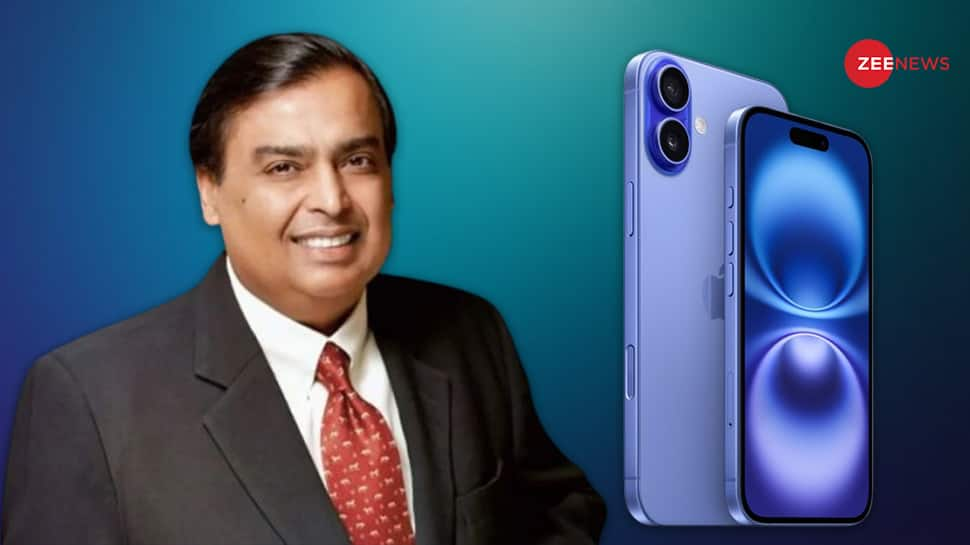
Diwali Gift For iPhone Lovers In India: Mukesh Ambani-led Reliance Digital has delivered a massive Diwali surprise for Apple enthusiasts with an unbelievable offer on the upcoming iPhone 16. In a special festive deal, Reliance Digital is offering the much-anticipated iPhone 16 for just Rs 13,000 alongside Amazon and Flipkart, making it a steal for tech lovers across India. This limited-time offer, bundled with Jio’s exclusive plans, marks a significant price drop from its expected market value. With Diwali around the corner, with bank discounts and a No-Cost EMI option, this is the perfect time to bring home an iPhone 16. Notably, Apple’s iPhone 16 was launched in early September. iPhone 16 Price Break Up With No-Cost EMI At Rs 13,000 Reliance Digital is offering the 128GB variant of the phone at a sale price of Rs 79,900. However, if you make the purchase from Reliance Digital, you’ll receive an instant discount of Rs 5,000, bringing the cost down to Rs 74,900. Adding further, if you use an ICICI, SBI, or Kotak Bank credit card, you can avail of an instant discount of Rs 5,000, reducing the final price to Rs 74,900. As an added benefit, Reliance Digital provides a No-Cost EMI option, allowing you to pay Rs 12,483 per month (around Rs 13,000) for six months, making the latest iPhone more accessible without stretching your budget. iPhone 16 Specifications The premium phone features a 6.1-inch OLED display with 1179 x 2556 pixels resolution and a 60Hz refresh rate. The newly launched iPhone 16 is a dual SIM (US: eSIM, Worldwide: Nano+eSIM) handset that runs on iOS 18. It is powered by 3561mAh battery and a 3nm octa-core A18 chipset that features a 6-core CPU, 5-core GPU, and a 16-core neural engine. It comes with upgraded Ceramic Shield protection and the Dynamic Island. The handset has an IP68 rating for dust and water resistance. The iPhone 16 comes with a new camera control feature that enables users to adjust settings by sliding a finger on the screen, located on the right side below the on/off switch. On the optics front, this phone uses a 48-megapixel main camera and a 12-megapixel ultrawide lens. For Connectivity, the iPhone 16 supports 5G, 4G LTE, Wi-Fi 6E, Bluetooth, GPS, NFC, and a USB Type-C port.

Vivo, iQOO Launch Funtouch OS 15 With AI Features In India; iQOO 12 Becomes First Smartphone With Android 15 | Technology News
Funtouch OS 15 Update India: Chinese smartphone brands Vivo and iQOO have started rolling out the Android 15-based Funtouch OS 15 Update in India. The new Funtouch OS 15 update brings new algorithms, enhanced animations and effects along with artificial intelligence (AI) features which aim to improve the user experience along with the device’s overall experience. The latest update enables users to personalize their devices with more than 3,800 design elements, including system colours, fonts, icons, and wallpapers. Moreover, the new features include customisable app icon styles and adjustable icon shapes and sizes. Notably, the companies have become one of the first original equipment manufacturers (OEMs) to introduce Android 15 on their handsets, leaving behind tech giants such as Samsung and Google. The company has unveiled the full list of devices in India set to receive the beta update, with the rollout starting in mid-October 2024 and continuing through May 2025. Key Features Of Funtouch OS 15 Update: -A new scheduling algorithm, ‘Priority Scheduling,’ has been introduced to improve app opening speed by up to 15% during heavy usage. -It uses an optimized zRAM compression algorithm, increasing compression speed by 40% and reducing GPU memory usage for background apps. -Animated effects have been added to system interactions, with over 700 touch scenarios optimized for smoother and more responsive performance. -The Lightning-Speed Engine aims to enhance app opening speed further, targeting a 20% improvement. iQOO FuntouchOS 15 Rollout According to the company, the Funtouch OS 15 update will be available for download on the iQOO 12. Hence, the iQOO 12 became the first smartphone to get Android 15, followed by the iQOO 11 in November. It is important to note that the other phones from the brand will receive the update in the coming weeks and months. Vivo FuntouchOS 15 Rollout Vivo is set to begin the Funtouch OS 15 rollout in mid-October 2024, starting with the Vivo X100, Vivo X100 Pro, and Vivo X Fold3 Pro. The V series will follow in mid-December 2024, while the Y series and T series will receive the update between mid-February and mid-June 2025.

How To Hide WhatsApp Chats On iPhone, Android Without Archiving; Follow THESE Simple Steps | Technology News
New Delhi: WhatsApp, an instant messaging platform, is used by millions of users across the globe. Want to keep your WhatsApp chats hidden without using the archive feature? While WhatsApp doesn’t offer a direct way to hide chats, there are some workarounds you can try on your iPhone or Android device. These tricks help you maintain privacy and keep certain conversations out of sight. Many users prefer not to delete the chats as to refer to them later while others may want to avoid exposing the details of the chats. However, one way to hide a message on WhatsApp is by archiving the chat. However, one drawback of this feature is you do not receive any notification when a new message is sent from that chat. In this article, we will show you simple methods to hide your WhatsApp chats without archiving them on iPhone, or Android so you can enjoy more privacy on your Android phone. (Also Read: How To Send WhatsApp Message Without Saving Number On iPhone, Android; Follow THESE Simple Steps) How To Hide WhatsApp Chats On iPhone Without Archiving Step 1: Open WhatsApp on your device and tap the ‘Settings’ icon located in the bottom-right corner. Step 2: In the Settings menu, navigate to the ‘Privacy’ section. Step 3: Scroll down and select ‘Screen Lock’ from the options available. Step 4: You will be prompted to see either ‘Require Face ID’ or ‘Require Touch ID’ based on your device. Step 5: Toggle the switch to enable the Face ID or Touch ID feature. Step 6: Once enabled, choose one of the time options: Immediately, After 1 minute, After 15 minutes, or After 1 hour. WhatsApp will now require Face ID or Touch ID to unlock, based on your selected time interval. How To Hide WhatsApp Chats On Android Without Archiving Step 1: Open WhatsApp on your phone and tap on the three dots in the top-right corner to go to ‘Settings.’ Step 2: Navigate to ‘Privacy’ and then select ‘Account.’ Step 3: In the ‘Account’ section, choose ‘Fingerprint Lock,’ and enable ‘Unlock with Fingerprint.’ Step 4: Finally, select one of the time options to decide how long before WhatsApp should lock automatically.

How To Send WhatsApp Message Without Saving Number On iPhone, Android; Follow THESE Simple Steps | Technology News
WhatsApp Message Without Saving Contact: WhatsApp has become the go-to messaging app for billions of users worldwide, offering a seamless way to send texts, photos, videos, and documents on iPhone and Android. There are some instances when you might need to message someone without saving their number. Usually, WhatsApp requires you to save a contact before sending a message. However, there’s a way to skip this step. This handy technique can save you time and prevent unnecessary contacts from cluttering your list. How To Send WhatsApp Messages Without Saving Contacts on iPhone, Android Step 1: Open the WhatsApp application on your Android or iOS device. Step 2: Copy the mobile number you wish to message. Step 3: Tap the New Chat button at the bottom-right corner of the screen. Step 4: Select your own contact under WhatsApp Contacts to open a new chat with yourself. Step 5: Paste the copied number into the message text box and click Send. Step 6: Tap on the mobile number in the chat, and if the person uses WhatsApp, tap Chat to send them a message directly. Users can send WhatsApp messages without saving contacts through various methods, including Google Assistant on Android, third-party apps, WhatsApp QR codes, or the Shortcut app on iPhone. These options provide flexible, time-saving solutions for communication, eliminating the need to save contacts before messaging. Hence, these methods simplify the process of sending WhatsApp messages without the hassle of saving numbers, making it more convenient for casual and temporary communications. Moreover, WhatsApp is also introducing a significant update in its latest Android beta version 2.24.20.28, aimed at boosting user safety and enhancing interactions with unknown contacts. A key feature of this update is a safety screen that appears when users receive a message from an unknown sender. The screen offers helpful guidance on managing these interactions, including options to block or report the sender.
Apple iOS 18: How To Customise Lock Screen Widgets In iPhones; Follow THESE Simple Steps | Technology News
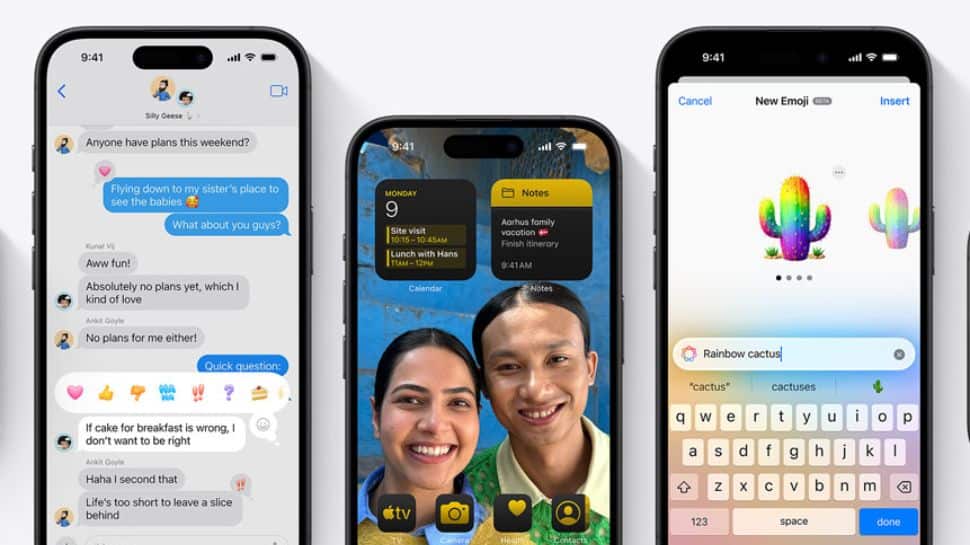
Apple iOS 18: Tired of your home screen? With Apple iOS 18, you can now fully customize and personalize your lock screen using widgets, making it more flexible and user-friendly than ever before. The widgets allow users to access information such as weather updates, calendar events, and reminders right from the lock screen, enhancing the convenience of your iPhone. With iOS 18, you can easily add, rearrange, and customize widgets to suit your preferences. iPhone users can now customize the colour of app icons and widgets, even matching them to the wallpaper, and adjust their size to appear larger. Moreover, several new apps have been introduced, including Journal and Passwords, along with an enhanced Calculator. The Photos app has undergone a redesign, while both the Notes and Camera apps have received improvements. How To Add, Rearrange, And Customize Widgets on Your iOS 18 Lock Screen Step 1: Press and hold the lock screen to enter customization mode. Step 2: Tap “Customize Widgets” from the menu that appears at the bottom of the screen. Step 3: Choose your widgets by tapping and holding one, then moving it to your preferred spot. Step 4: To add more widgets, tap the “+” button. Step 5: Customize the appearance of a widget by tapping and holding it, then selecting “Edit Widget.” Step 6: Rearrange widgets by tapping and holding one, then dragging it to a new position. Step 7: Add more pages by swiping left or right if you have more widgets that can fit on one page. Step 8: Organize the widgets across multiple pages for a better layout. Step 9: Tap “Done” to save your custom lock screen setup. Step 10: Review your changes to ensure your lock screen is customized as you like.