In this article, you will learn how to build a local, privacy-first tool-calling agent using the Gemma 4 model family and Ollama.
Topics we will cover include:
- An overview of the Gemma 4 model family and its capabilities.
- How tool calling enables language models to interact with external functions.
- How to implement a local tool calling system using Python and Ollama.
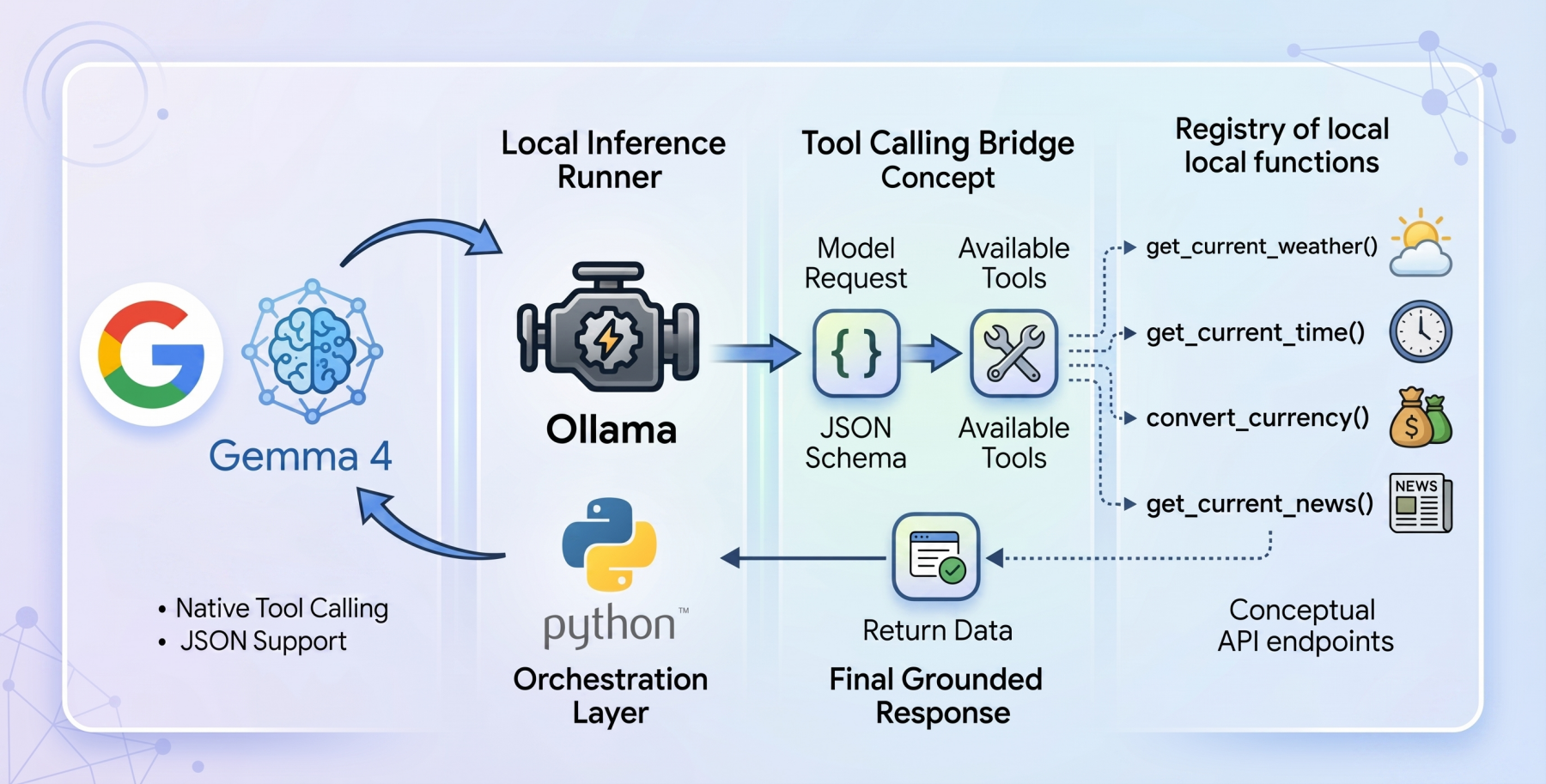
How to Implement Tool Calling with Gemma 4 and Python
Image by Editor
Introducing the Gemma 4 Family
The open-weights model ecosystem shifted recently with the release of the Gemma 4 model family. Built by Google, the Gemma 4 variants were created with the intention of providing frontier-level capabilities under a permissive Apache 2.0 license, enabling machine learning practitioners complete control over their infrastructure and data privacy.
The Gemma 4 release features models ranging from the parameter-dense 31B and structurally complex 26B Mixture of Experts (MoE) to lightweight, edge-focused variants. More importantly for AI engineers, the model family features native support for agentic workflows. They have been fine-tuned to reliably generate structured JSON outputs and natively invoke function calls based on system instructions. This transforms them from “fingers crossed” reasoning engines into practical systems capable of executing workflows and conversing with external APIs locally.
Tool Calling in Language Models
Language models began life as closed-loop conversationalists. If you asked a language model for real-world sensor reading or live market rates, it could at best apologize, and at worst, hallucinate an answer. Tool calling, aka function calling, is the foundational architecture shift required to fix this gap.
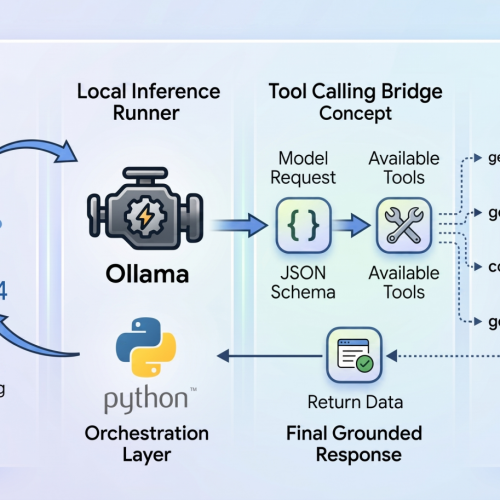
Tool calling serves as the bridge that can help transform static models into dynamic autonomous agents. When tool calling is enabled, the model evaluates a user prompt against a provided registry of available programmatic tools (supplied via JSON schema). Rather than attempting to guess the answer using only internal weights, the model pauses inference, formats a structured request specifically designed to trigger an external function, and awaits the result. Once the result is processed by the host application and handed back to the model, the model synthesizes the injected live context to formulate a grounded final response.
The Setup: Ollama and Gemma 4:E2B
To build a genuinely local, private-first tool calling system, we will use Ollama as our local inference runner, paired with the gemma4:e2b (Edge 2 billion parameter) model.
The gemma4:e2b model is built specifically for mobile devices and IoT applications. It represents a paradigm shift in what is possible on consumer hardware, activating an effective 2 billion parameter footprint during inference. This optimization preserves system memory while achieving near-zero latency execution. By executing entirely offline, it removes rate limits and API costs while preserving strict data privacy.
Despite this incredibly small size, Google has engineered gemma4:e2b to inherit the multimodal properties and native function-calling capabilities of the larger 31B model, making it an ideal foundation for a fast, responsive desktop agent. It also allows us to test for the capabilities of the new model family without requiring a GPU.
The Code: Setting Up the Agent
To orchestrate the language model and the tool interfaces, we will rely on a zero-dependency philosophy for our implementation, leveraging only standard Python libraries like urllib and json, ensuring maximum portability and transparency while also avoiding bloat.
The complete code for this tutorial can be found at this GitHub repository.
The architectural flow of our application operates in the following way:
- Define local Python functions that act as our tools
- Define a strict JSON schema that explains to the language model exactly what these tools do and what parameters they expect
- Pass the user’s query and the tool registry to the local Ollama API
- Catch the model’s response, identify if it requested a tool call, execute the corresponding local code, and feed the answer back
Building the Tools: get_current_weather
Let’s dive into the code, keeping in mind that our agent’s capability rests on the quality of its underlying functions. Our first function is get_current_weather, which reaches out to the open-source Open-Meteo API to resolve real-time weather data for a specific location.
|
1 2 3 4 5 6 7 8 9 10 11 12 13 14 15 16 17 18 19 20 21 22 23 24 25 26 27 28 29 30 31 32 33 34 35 36 37 |
def get_current_weather(city: str, unit: str = “celsius”) -> str: “”“Gets the current temperature for a given city using open-meteo API.”“” try: # Geocode the city to get latitude and longitude geo_url = f“https://geocoding-api.open-meteo.com/v1/search?name={urllib.parse.quote(city)}&count=1” geo_req = urllib.request.Request(geo_url, headers={‘User-Agent’: ‘Gemma4ToolCalling/1.0’}) with urllib.request.urlopen(geo_req) as response: geo_data = json.loads(response.read().decode(‘utf-8’))
if “results” not in geo_data or not geo_data[“results”]: return f“Could not find coordinates for city: {city}.”
location = geo_data[“results”][0] lat = location[“latitude”] lon = location[“longitude”] country = location.get(“country”, “”)
# Fetch the weather temp_unit = “fahrenheit” if unit.lower() == “fahrenheit” else “celsius” weather_url = f“https://api.open-meteo.com/v1/forecast?latitude={lat}&longitude={lon}¤t=temperature_2m,wind_speed_10m&temperature_unit={temp_unit}” weather_req = urllib.request.Request(weather_url, headers={‘User-Agent’: ‘Gemma4ToolCalling/1.0’}) with urllib.request.urlopen(weather_req) as response: weather_data = json.loads(response.read().decode(‘utf-8’))
if “current” in weather_data: current = weather_data[“current”] temp = current[“temperature_2m”] wind = current[“wind_speed_10m”] temp_unit_str = weather_data[“current_units”][“temperature_2m”] wind_unit_str = weather_data[“current_units”][“wind_speed_10m”]
return f“The current weather in {city.title()} ({country}) is {temp}{temp_unit_str} with wind speeds of {wind}{wind_unit_str}.” else: return f“Weather data for {city} is unavailable from the API.”
except Exception as e: return f“Error fetching weather for {city}: {e}” |
This Python function implements a two-stage API resolution pattern. Because standard weather APIs typically require strict geographical coordinates, our function transparently intercepts the city string provided by the model and geocodes it into latitude and longitude coordinates. With the coordinates formatted, it invokes the weather forecast endpoint and constructs a concise natural language string representing the telemetry point.
However, writing the function in Python is only half the execution. The model needs to be informed visually about this tool. We do this by mapping the Python function into an Ollama-compliant JSON schema dictionary:
|
1 2 3 4 5 6 7 8 9 10 11 12 13 14 15 16 17 18 19 20 21 |
{ “type”: “function”, “function”: { “name”: “get_current_weather”, “description”: “Gets the current temperature for a given city.”, “parameters”: { “type”: “object”, “properties”: { “city”: { “type”: “string”, “description”: “The city name, e.g. Tokyo” }, “unit”: { “type”: “string”, “enum”: [“celsius”, “fahrenheit”] } }, “required”: [“city”] } } } |
This rigid structural blueprint is critical, as it explicitly details variable expectations, strict string enums, and required parameters, all of which guide the gemma4:e2b weights into reliably generating syntax-perfect calls.
Tool Calling Under the Hood
The core of the autonomous workflow happens primarily inside the main loop orchestrator. Once a user issues a prompt, we establish the initial JSON payload for the Ollama API, explicitly linking gemma4:e2b and appending the global array containing our parsed toolkit.
|
# Initial payload to the model messages = [{“role”: “user”, “content”: user_query}] payload = { “model”: “gemma4:e2b”, “messages”: messages, “tools”: available_tools, “stream”: False }
try: response_data = call_ollama(payload) except Exception as e: print(f“Error calling Ollama API: {e}”) return
message = response_data.get(“message”, {}) |
Once the initial web request resolves, it is critical that we evaluate the architecture of the returned message block. We are not blindly assuming text exists here. The model, aware of the active tools, will signal its desired outcome by attaching a tool_calls dictionary.
If tool_calls exist, we pause the standard synthesis workflow, parse the requested function name out of the dictionary block, execute the Python tool with the parsed kwargs dynamically, and inject the returned live data back into the conversational array.
|
1 2 3 4 5 6 7 8 9 10 11 12 13 14 15 16 17 18 19 20 21 22 23 24 25 26 27 28 29 30 31 32 33 34 35 36 37 38 |
# Check if the model decided to call tools if “tool_calls” in message and message[“tool_calls”]:
# Add the model’s tool calls to the chat history messages.append(message)
# Execute each tool call num_tools = len(message[“tool_calls”]) for i, tool_call in enumerate(message[“tool_calls”]): function_name = tool_call[“function”][“name”] arguments = tool_call[“function”][“arguments”]
if function_name in TOOL_FUNCTIONS: func = TOOL_FUNCTIONS[function_name] try: # Execute the underlying Python function result = func(**arguments)
# Add the tool response to messages history messages.append({ “role”: “tool”, “content”: str(result), “name”: function_name }) except TypeError as e: print(f“Error calling function: {e}”) else: print(f“Unknown function: {function_name}”)
# Send the tool results back to the model to get the final answer payload[“messages”] = messages
try: final_response_data = call_ollama(payload) print(“[RESPONSE]”) print(final_response_data.get(“message”, {}).get(“content”, “”)+“\n”) except Exception as e: print(f“Error calling Ollama API for final response: {e}”) |
Notice the important secondary interaction: once the dynamic result is appended as a “tool” role, we bundle the messages history up a second time and trigger the API again. This second pass is what allows the gemma4:e2b reasoning engine to read the telemetry strings it previously hallucinated around, bridging the final gap to output the data logically in human terms.
More Tools: Expanding the Tool Calling Capabilities
With the architectural foundation complete, enriching our capabilities requires nothing more than adding modular Python functions. Using the identical methodology described above, we incorporate three additional live tools:
get_current_news: Utilizing NewsAPI endpoints, this function parses arrays of global headlines based on queried keyword topics that the model identifies as contextually relevantget_current_time: By referencing TimeAPI.io, this deterministic function bridges complex real-world timezone logic and offsets back into native, readable datetime stringsconvert_currency: Relying on the live ExchangeRate-API, this function enables mathematical tracking and fractional conversion computations between fiat currencies
Each capability is processed through the JSON schema registry, expanding the baseline model’s utility without requiring external orchestration or heavy dependencies.
Testing the Tools
And now we test our tool calling.
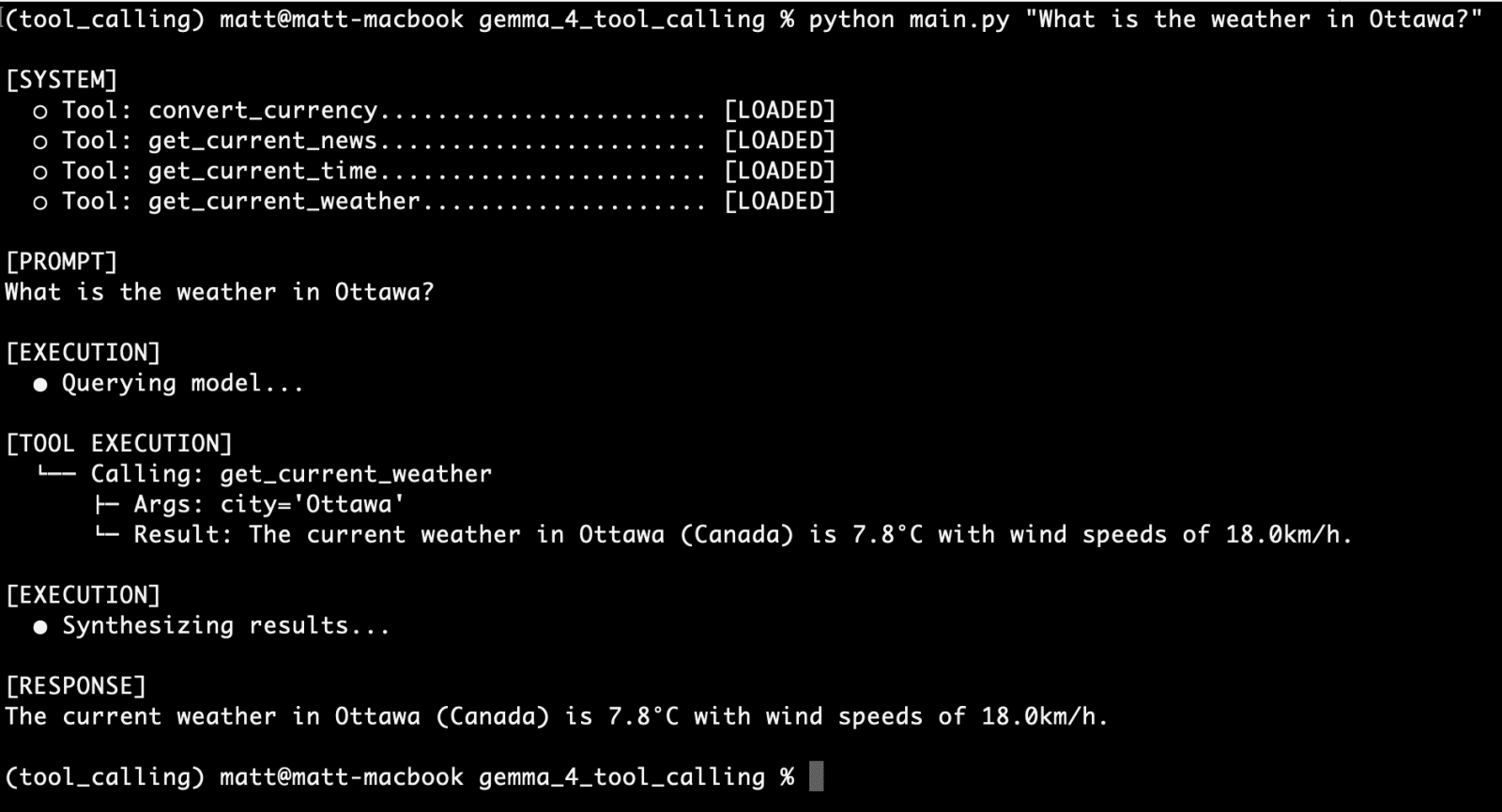
Let’s start with the first function we created, get_current_weather, with the following query:
What is the weather in Ottawa?
What is the weather in Ottawa?
You can see our CLI UI provides us with:
- confirmation of the available tools
- the user prompt
- details on tool execution, including the function used, the arguments sent, and the response
- the the language model’s response
It appears as though we have a successful first run.
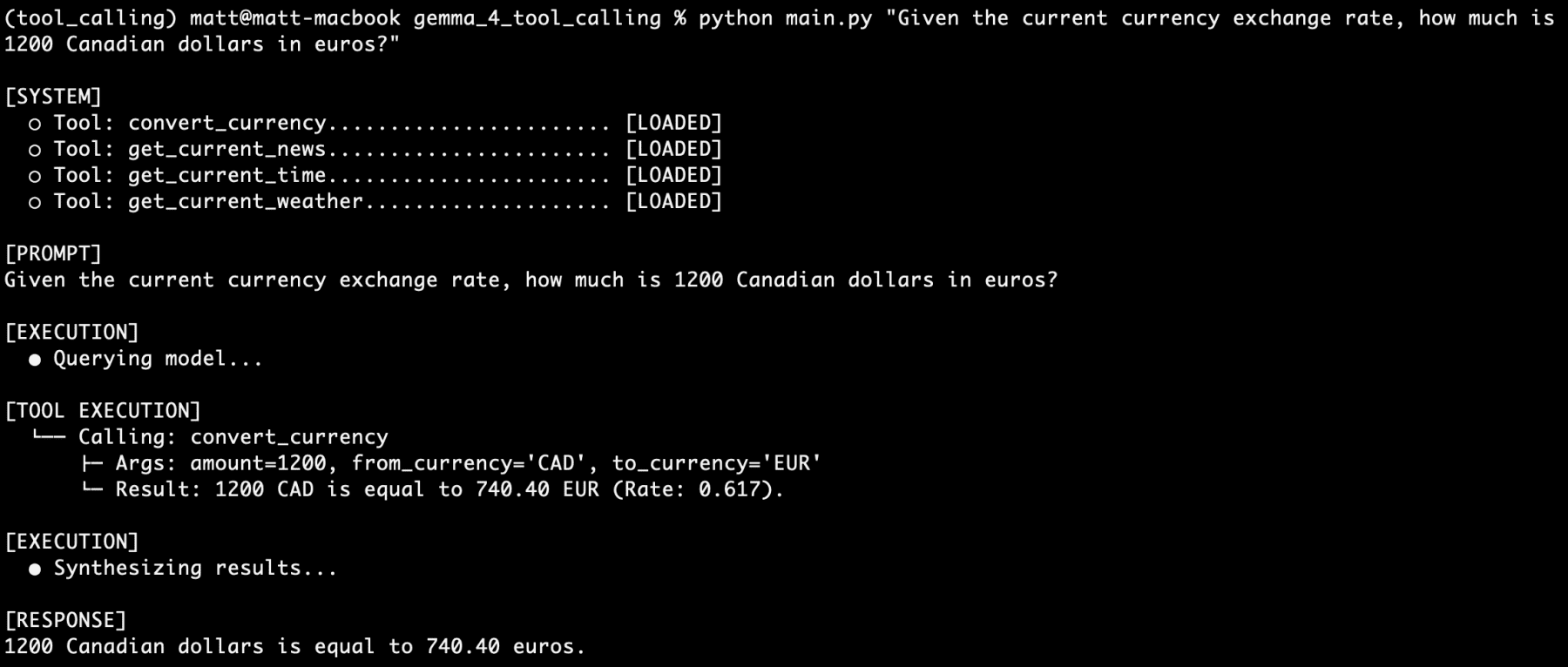
Next, let’s try out another of our tools independently, namely convert_currency:
Given the current currency exchange rate, how much is 1200 Canadian dollars in euros?
Given the current currency exchange rate, how much is 1200 Canadian dollars in euros?
More winning.
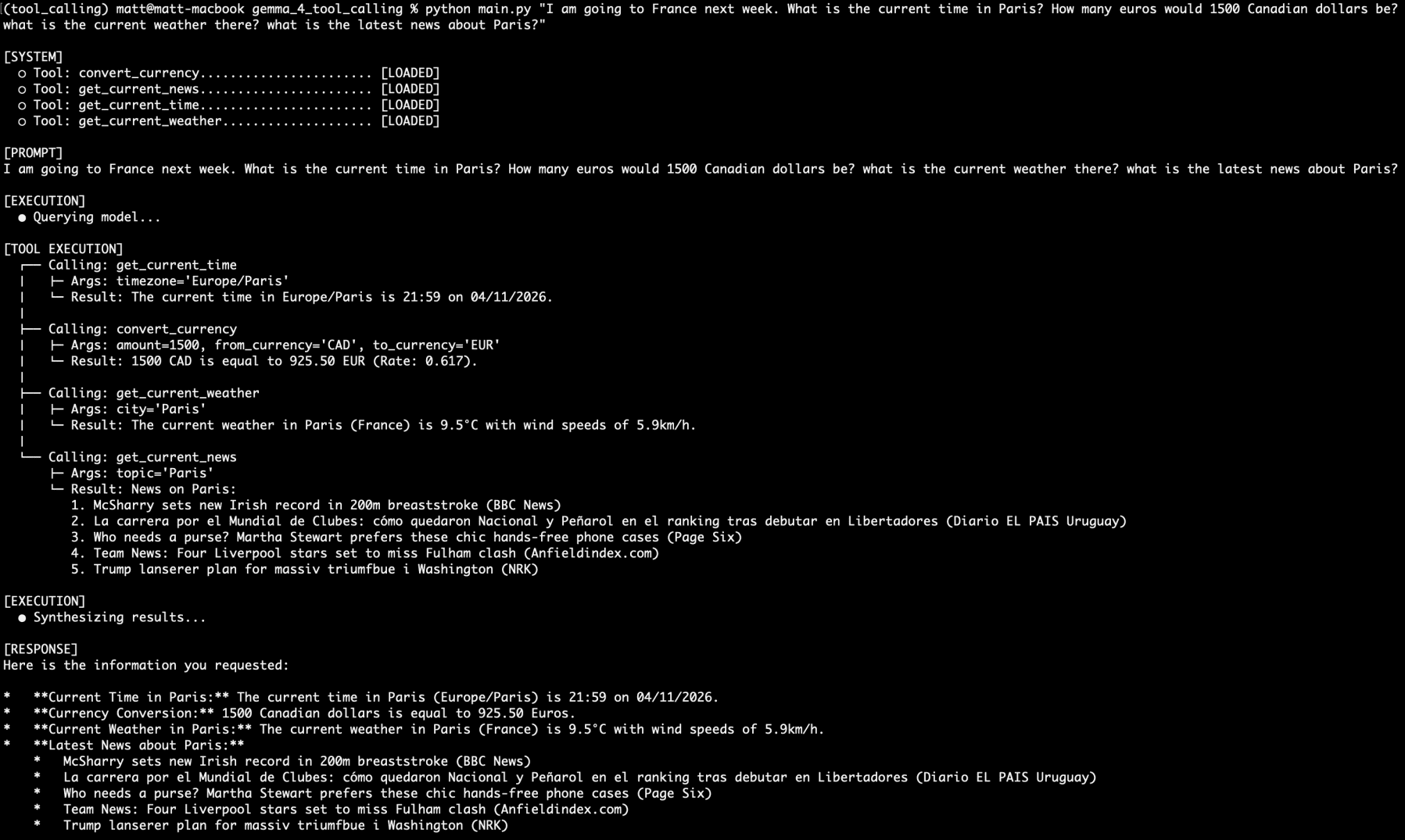
Now, let’s stack tool calling requests. Let’s also keep in mind that we are using a 4 billion parameter model that has half of its parameters active at any one time during inference:
I am going to France next week. What is the current time in Paris? How many euros would 1500 Canadian dollars be? what is the current weather there? what is the latest news about Paris?
I am going to France next week…
Would you look at that. All four questions answered by four different functions from the four separate tool calls. All on a local, private, incredibly small language model served by Ollama.
I ran queries on this setup over the course of the weekend, and never once did the model’s reasoning fail. Never once. Hundreds of prompts. Admittedly, they were on the same four tools, but regardless of how vague my otherwise reasonable wording become, I couldn’t stump it.
Gemma 4 certainly appears to be a powerhouse of a small language model reasoning engine with tool calling capabilities. I’ll be turning my attention to building out a fully agentic system next, so stay tuned.
Conclusion
The advent of tool calling behavior inside open-weight models is one of the more useful and practical developments in local AI of late. With the release of Gemma 4, we can operate securely offline, building complex systems unfettered by cloud and API restrictions. By architecturally integrating direct access to the web, local file systems, raw data processing logic, and localized APIs, even low-powered consumer devices can operate autonomously in ways that were previously restricted exclusively to cloud-tier hardware.